nRF24L01+ Transmitter/Receiver

The nRF24L01+ is an awesome and compact radio transceiver IC from Nordic. It operates at 2.4Ghz, has a range of about 100 meters (at least with the modules/antennas used in this demo) and can be controlled using the SPI protocol.
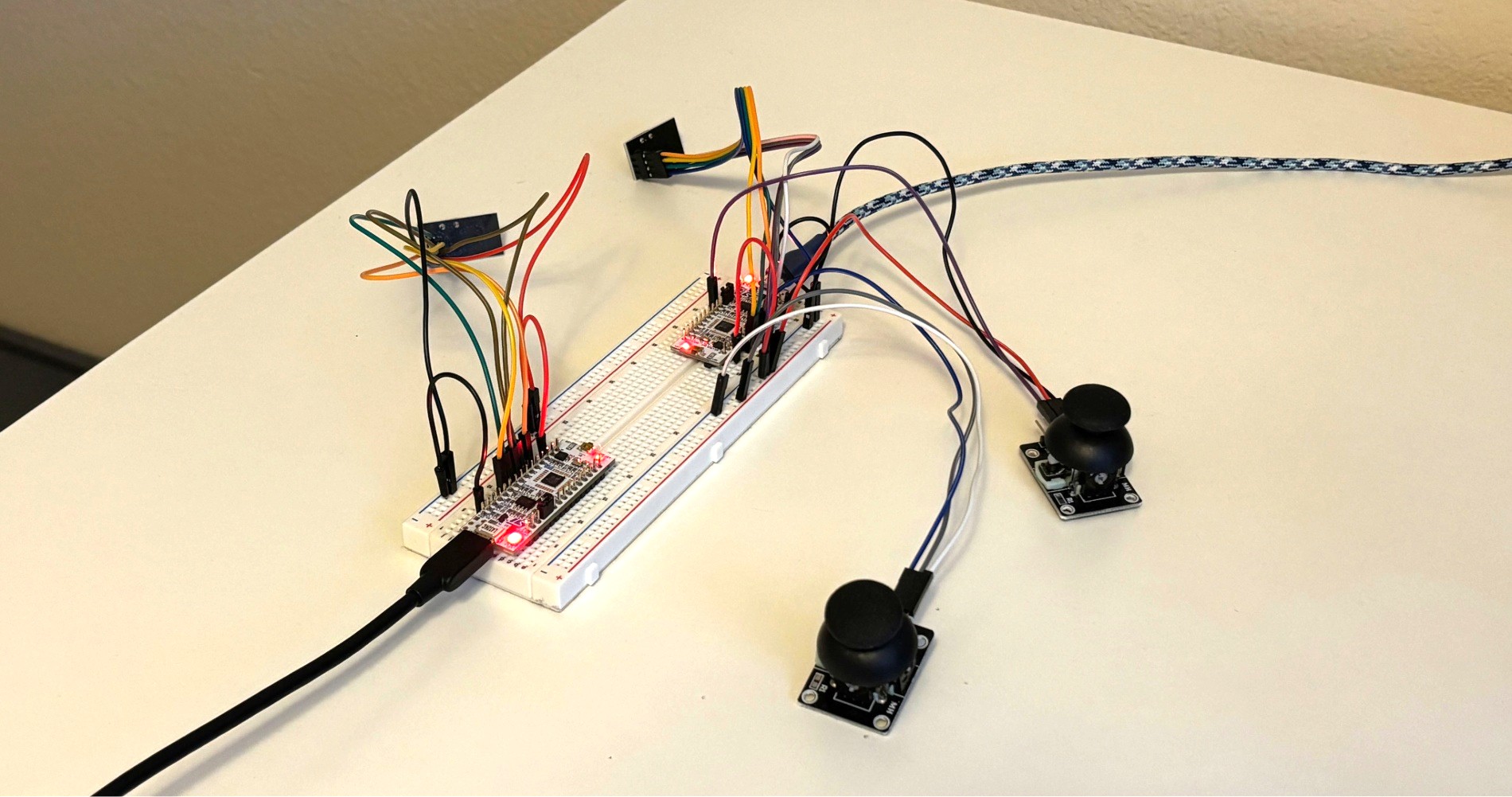
For this demo, I’ve set up two STM32 Nucleo boards to control a pair of nRF24L01+ modules. The first STM32 sets its nRF as a transmitter and takes input from two joysticks. It then packages up the joystick data and sends it over the air to the other nRF/STM32 pair which is configured as a receiver. Both the transmitter and receiver STM32s log the joystick axes to the console.
Components
- 2x STM32 Nucleo L432KC
- 2x nRF24L01+ Modules
- 2x joysticks
- 24x jumper wires
- 1x breadboard
CubeMX Pinout Diagram
Joystick ADCs
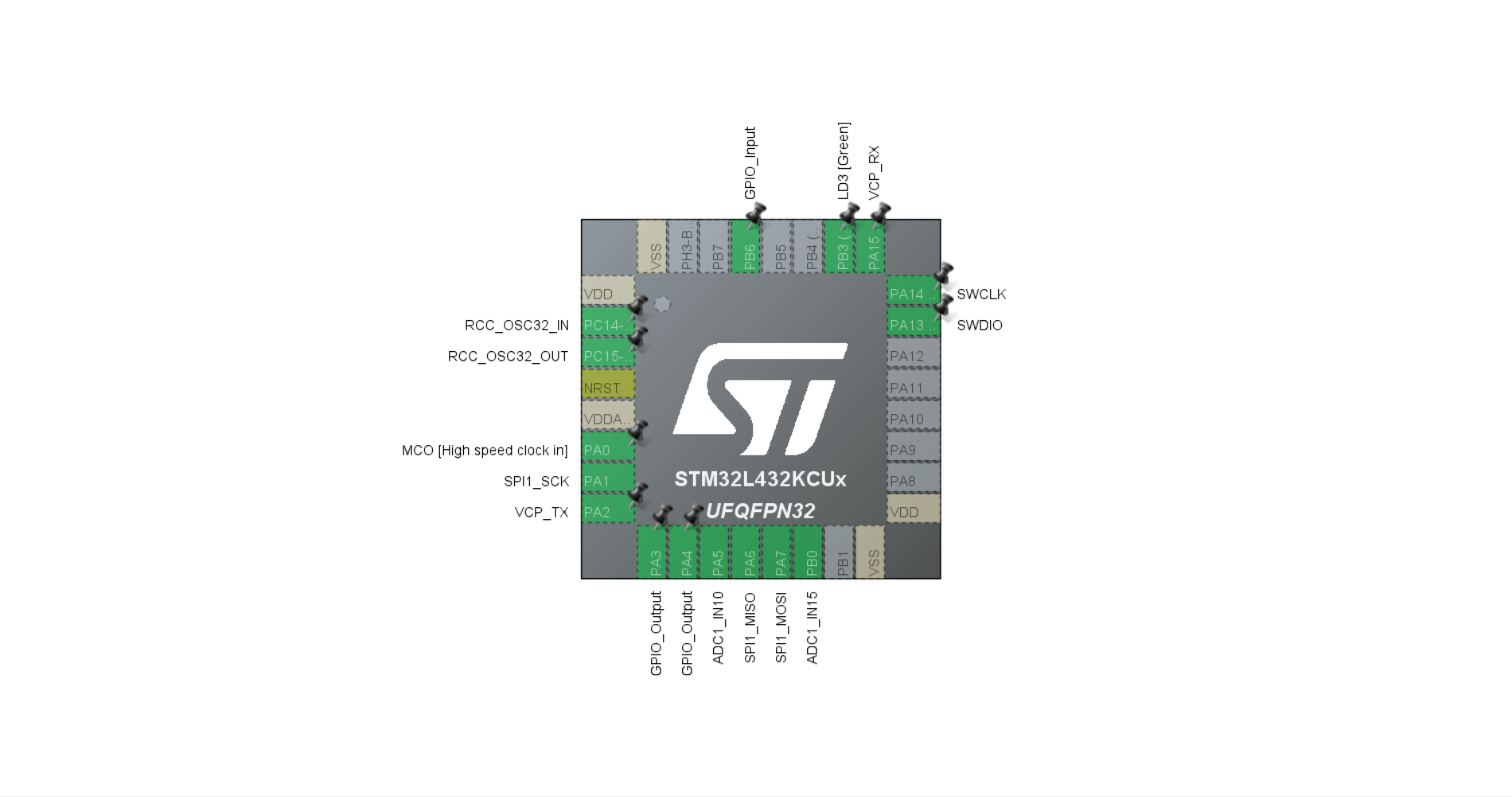
To configure the joysticks, I made use of the STM32’s on-board analog-to-digital converters (ADCs). Within CubeMX, inside the Analog > ADC1 tab, I enabled IN10 and IN15 as single-ended inputs. This automatically activated pins PA5 and PB0 of the MCU as the ADC inputs (see above image).
The wiring for the joysticks was as follows:
- V - 3.3v
- GND - GND
VRX - PA5
- V - 3.3v
- GND - GND
- VRX - PB0
Configuring SPI
To configure the STM32 to communicate over SPI, I set the following in CubeMX:
- Set SPI1 to Full-Duplex Master mode
- Frame rate: Motorola
- Data size: 8 Bits
- First bit: MSB First
- Prescaler: 32
- Baud rate: 1000.0 KBits/s
- NSSP Mode: Disabled
Making those configurations automatically activated the following pins (see above image):
- PA1 to be used as the SPI1 clock
- PA6 to be used as the SPI1 MISO
- PA7 to be used as the SPI1 MOSI
Configuring CE and CSN
CSN
To finish configuring for SPI, I set the pin PA4 as a GPIO output. This pin will be used as the CSN pin and will start and end each SPI communication.
CE
Lastly, I’ve set pin PA3 as a GPIO output. While not a part of the SPI process, this pin will be used to trigger transmissions of the data packets that were sent to the nRF over SPI.
Code
To view the source code for this project, please refer to my BroncoTx and BroncoRx repos on Github.
The following code snippets cover the main.c file of the transmitter, but not every function that is called from main.c. To view the remainder of the application code, view the registers.c and joystick.c files in the BroncoTx repo and the main.c file in the BroncoRx repo.
Joystick data type
In order to structure the joystick data, I create a new type called joystick_payload_t that will store the x and y values as 16 bit integers:
1
2
3
4
typedef struct {
  uint16_t x;
  uint16_t y;
} joystick_payload_t;
Pin and register macros
The following macros define a port and pin for the Chip Enable, as well as several config registers on the nRF:
1
2
3
4
5
6
7
8
9
#define CE_Port GPIOA
#define CE_Pin GPIO_PIN_3

#define NRF24_REG_CONFIG 0x00

#define NRF24_REG_RF_CH 0x05
#define NRF24_REG_STATUS 0x07
#define NRF24_REG_RX_ADDR_P0 0x0A
#define NRF24_REG_TX_ADDR 0x10
Transmit/Receive Address
The transmit address needs to be defined. Below, I create a five-byte array variable called addr. Each item in this array has a value of 0xE7. This is actually the default (reset) value for the RX_ADDR_P0 and TX_ADDR registers after the chip powers on, so it technically doesn’t need to be defined. However, having this variable explicitly set will make it easier to add more receiver modules down the road. This value will act as a device ID for the receiver.
1
uint8_t addr[5] = {0xE7, 0xE7, 0xE7, 0xE7, 0xE7};
In the following lines, the transmitter is being told which address on the receiver it should write to. Then the transmitter sets its own receiving address where it will receive acknowledgement data packets sent back from the receiver:
1
2
nrf24_write_addr_reg(NRF24_REG_TX_ADDR, addr, 5);
nrf24_write_addr_reg(NRF24_REG_RX_ADDR_P0, addr, 5);
Frequency
Now that the transmitter knows the address it will send data packets to, it needs to know what frequency to operate on. The following line of code sets the RF channel frequency to 2476MHz:
1
nrf24_write_reg(NRF24_REG_RF_CH, 76);
On the backend, the transmitter is using the RF_CH register value of 76 in the following formula:
1
F0= 2400 + RF_CH [MHz]
This same frequency will be set on the receiver as well.
PWR_UP!
From its powered-down state, the nRF is powered up and enters standby mode by setting the PWR_UP bit in the CONFIG register. The following line sets both the PWR_UP and EN_CRC bits:
1
nrf24_write_reg(NRF24_REG_CONFIG, 0x0A);
When the PWR_UP bit is set, the nRF enters Standby-I mode.
The Cyclic Redundancy Check (CRC) is an insanely cool error detection mechanism. Enabling the EN_CRC bit directs the nRF to generate a checksum value using the address, packet control field and payload of each transmission. This checksum value is then appended to the payload. The receiver (which should also have EN_CRC enabled) will then verify this checksum value and decide whether or not to accept the packet.
A Slight Delay
At this point in the code, the nRF configuration is complete. However, the datasheet (6.1.7 Timing Information) explains that there is, at most, a 4.5ms delay when transitioning from Power Down to Standby mode. To make sure nothing happens during this 4.5ms, the following line creates a 5ms delay before the code enters the main loop:
1
HAL_Delay(5);
The While Loop
The main while loop handles the following operations:
- Reads joystick data into an object called payload
- Writes that payload object to the nRF’s payload register (W_TX_PAYLOAD)
- Pulses the CE pin, triggering the transmission
- Reads the status register
- Clears the status register by resetting bits RX_DR, TX_DS, and MAX_RT
- Prints the status register, x and y values
- Adds a delay of 200ms
1
2
3
4
5
6
7
8
9
10
  while (1) {
    Joystick_Read(&payload.x, &payload.y); // added to send joystick data
    nrf24_write_payload((uint8_t *)&payload, sizeof(payload)); // added to send joystick data
    nrf24_pulse_ce();
    uint8_t status = nrf24_read_reg(NRF24_REG_STATUS);
    nrf24_write_reg(NRF24_REG_STATUS, 0x70); // clear RX_DR/TX_DS/MAX_RT by writing 1s

    printf("STATUS = 0x%02X | X: %4u  Y: %4u\r\n", status, payload.x, payload.y);
    HAL_Delay(200);
  }
Output
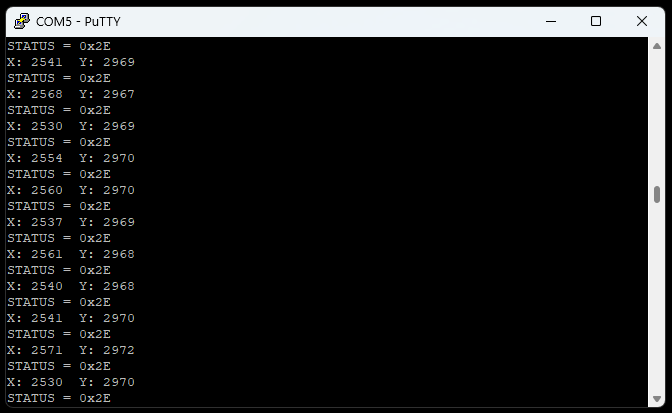
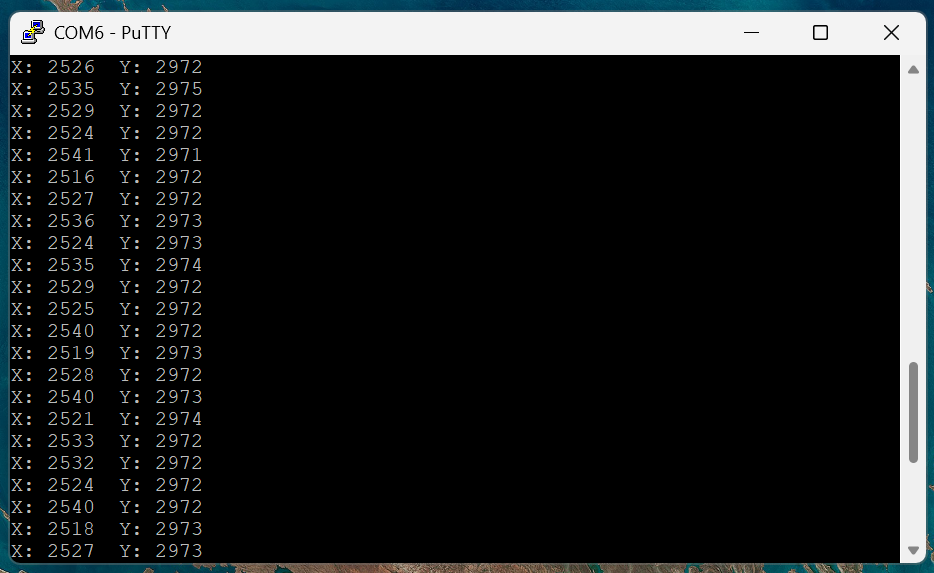
The following screenshots show the Putty outputs of both the transmitter and receiver. Joystick input is successfully being read, transmitted and received!